
Best Practices
Always proxy API requests through your server
Never expose the monorise API Gateway directly to the client. The API Gateway is protected only by an API key (x-api-key), which is a shared secret — if embedded in client-side code, anyone can extract it and manipulate your database directly.
Instead, use the edge-auth proxy pattern — your frontend server sits between the client and monorise, acting as a thin auth layer:
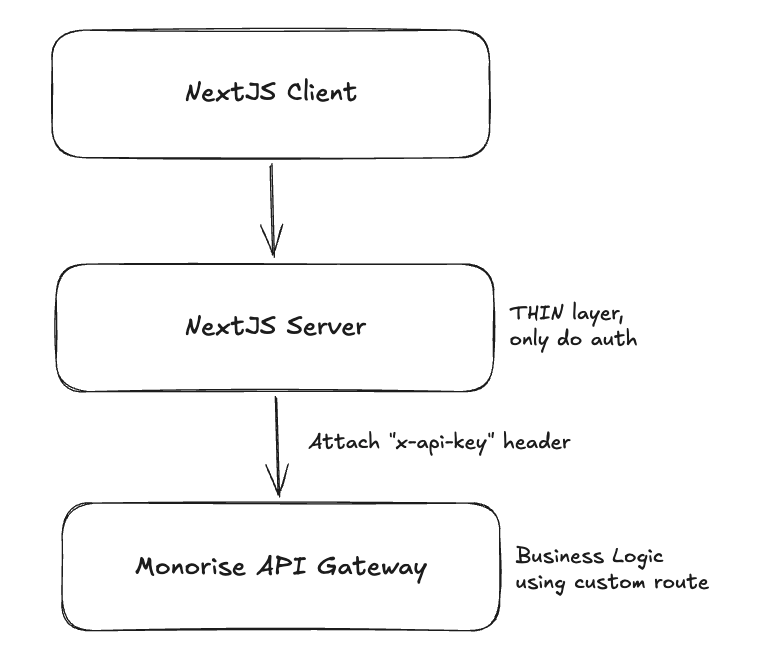
The frontend server is a thin proxy layer — its only job is to authenticate the user and attach the x-api-key header before forwarding to monorise. All business logic should live in monorise custom routes, not in the proxy layer.
Edge-auth proxy pattern with Next.js + SST
SST provides seamless Next.js deployment via sst.aws.Nextjs. This means your Next.js app already has a server — use its API routes as the proxy layer. No extra infrastructure needed.
Monorise Core creates the API_KEYS allow-list. Create a separate X_API_KEY secret in your application and link it to the Next.js server so only your backend proxy can read the selected key:
const { api } = new monorise.module.Core('core');
const xApiKey = new sst.Secret('X_API_KEY', 'secret1');

new sst.aws.Nextjs('web', {
  link: [api, xApiKey],
  environment: {
    API_BASE_URL: api.url,
  },
});
1. Proxy utility — rewrites client requests to the monorise API Gateway, validates auth, and attaches x-api-key:
// app/api/proxy-request.ts
import { type NextRequest, NextResponse } from 'next/server';
import { Resource } from 'sst';
import { validateToken } from './validate-token';

function rewriteUrl(requestUrl: string, replacePath?: string) {
  const path = replacePath
    ?? requestUrl.replace(/^https?:\/\/[^\/]+\/api\//, '');
  return `${process.env.API_BASE_URL}/${path}`;
}

export const proxyRequest = async ({
  req,
  path,
  skipAuthentication,
}: {
  req: NextRequest;
  path?: string;
  skipAuthentication?: boolean;
}) => {
  // 1. Validate auth (thin layer — only concern of the proxy)
  let accountId = '';
  if (!skipAuthentication) {
    const token = validateToken(req);
    if (token instanceof NextResponse) return token; // 401
    accountId = token.properties.accountId;
  }

  // 2. Parse body
  let body: string | undefined;
  try { body = JSON.stringify(await req.json()); } catch {}

  // 3. Forward to monorise with x-api-key
  return fetch(rewriteUrl(req.url, path), {
    method: req.method,
    body,
    headers: {
      'content-type': 'application/json',
      'account-id': accountId,
      'x-api-key': Resource.X_API_KEY.value,
    },
    cache: 'no-store',
  });
};
2. Catch-all API route — forwards all /api/* requests through the proxy:
// app/api/[...proxy]/route.ts
import type { NextRequest } from 'next/server';
import { proxyRequest } from '../proxy-request';

export const GET = (req: NextRequest) => proxyRequest({ req });
export const POST = (req: NextRequest) => proxyRequest({ req });
export const PATCH = (req: NextRequest) => proxyRequest({ req });
export const PUT = (req: NextRequest) => proxyRequest({ req });
export const DELETE = (req: NextRequest) => proxyRequest({ req });
3. Configure monorise/react to point at your proxy:
Monorise.config({
  entityConfig: EntityConfig,
  entityBaseUrl: '/api/core/entity',
  mutualBaseUrl: '/api/core/mutual',
  tagBaseUrl: '/api/core/tag',
});
Now all client-side hooks (useEntities, useMutuals, etc.) route through your Next.js server, which validates auth and attaches the API key server-side.
Why this matters
| Approach | API key visible to client? | Risk |
|---|---|---|
| Client → API Gateway directly | Yes (in JS bundle or network tab) | Anyone can create/delete entities |
| Client → Next.js Server → API Gateway | No (server-side only) | API key stays secret |
Additional benefits
Auth at the edge — validate JWTs, session tokens, or OAuth before forwarding to monorise
Inject context — enrich requests with server-side data (e.g.,
account-idfrom session)Rate limiting — protect against abuse at the proxy layer
Bring your own auth — the proxy pattern works with any auth provider (OpenAuth, AuthJs, Clerk, etc.) — just swap the
validateTokenimplementationEasy backend testing — since auth lives in the proxy and the API Gateway only checks
x-api-key, you can test the backend directly using HTTP clients like Postman, VS Code REST Client, or kulala (Neovim) without dealing with auth flows. Just create different environments with the right base URL and API key:http### List members GET {{BASE_URL}}/core/entity/member x-api-key: {{X_API_KEY}}
Use environment-specific API keys
Don't reuse the same API key across environments. Configure separate keys for development, staging, and production via the API_KEYS SST secret:
The two secrets have separate responsibilities:
| Secret | Purpose |
|---|---|
API_KEYS | Rotatable allow-list used by Monorise Core to verify requests |
X_API_KEY | One selected key held by your backend proxy and attached as the x-api-key request header |
# API Gateway accepts these keys (array of valid keys)
npx sst secret set API_KEYS '["dev-key-123"]' --stage dev
npx sst secret set API_KEYS '["prod-key-abc"]' --stage production

# Backend proxy sends one accepted key
npx sst secret set X_API_KEY 'dev-key-123' --stage dev
npx sst secret set X_API_KEY 'prod-key-abc' --stage production
TIP
API_KEYS is an array so old and new keys can overlap during rotation. X_API_KEY is the single key sent by the proxy and must match one value in that array.
Keep entity configs focused
Each entity config file should define a single entity. Avoid putting multiple entities in one file — the CLI expects one default export per file in the configDir.
monorise/configs/
  user.ts           ✓ one entity per file
  organisation.ts   ✓
  order.ts          ✓
Prefer direct mutuals over tree processors
If you know the relationship at creation time, add a direct mutual field instead of using a tree processor. Direct mutuals are cheaper (no write amplification) and simpler to reason about. See Tree Processors for details.
Use tags for access patterns, not data storage
Tags are for querying — filter by group, sort by value. Don't store business data in tag processors. The entity's baseSchema is the source of truth; tags are derived indexes.